

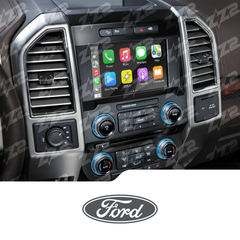
This is the 2nd vehicle that I have had this installed in. Would go back for a third when needed
Factory radio guide
Ford & Lincoln factory radios: which one do you have?
Ford and Lincoln used three main systems from 2008 on: the original SYNC with a small screen or none, the 8-inch MyFord Touch or MyLincoln Touch (often called SYNC 2), and SYNC 3, which can already run CarPlay. Only MyFord Touch takes a plug-in CarPlay kit, so start by checking your home screen and the buttons below it.
-
No plug-in kit
2008 and newer (mainly base and mid trims)
SYNC (first generation)
Ford SYNC first generation, a voice and Bluetooth system without the 8-inch touchscreen
How to tell
- No large touchscreen: just a small text display or a small colour screen of about 4 inches in the radio, run with buttons.
- A SYNC or voice button on the steering wheel or radio for calls and voice commands.
- You pair your phone by voice or through the radio's menu button.
CarPlay and Android Auto for this radio
No plug-in kit fits, because there's no factory touchscreen to show CarPlay on. The usual route is a replacement radio with CarPlay built in, so call us and we'll check what fits your vehicle.
-
CarPlay kit available
2011-2016, depending on model
MyFord Touch / MyLincoln Touch
SYNC with MyFord Touch or MyLincoln Touch, 8-inch touchscreen (often called SYNC 2)
How to tell
- An 8-inch touchscreen whose home screen is split into four coloured corners: phone, navigation, entertainment and climate.
- Most have two small screens in the gauge cluster, one on each side of the speedometer, run by small arrow pads on the steering wheel.
- A SYNC with MyFord Touch (or MyLincoln Touch) screen when it starts up.
- Check the panel below the screen: real push buttons are fine, but a flat, glossy panel you tap is touch-sensitive and won't work with the kit.
CarPlay and Android Auto for this radio
The ZZ-2 ITZ-SYNC2 adds wireless CarPlay and Android Auto plus camera inputs to this 8-inch system, but only when the controls below the screen are real push buttons. Some models, such as the 2011-2014 Edge, use touch-sensitive controls, and Lincoln models aren't on the kit's list, so call us with your VIN first. It's an expert install: the screen comes apart and a circuit board goes inside.
-
CarPlay usually built in
2016 and newer
SYNC 3
Ford SYNC 3 touchscreen system
How to tell
- A phone-like touchscreen with a row of icons along the bottom: audio, climate, phone, navigation, apps and settings.
- A SYNC 3 logo when it starts up.
- Swiping and pinching work like on a phone.
Quick check on the screen
Plug your phone into the USB port with a cable. If Apple CarPlay or Android Auto starts, your car already has it.
CarPlay and Android Auto for this radio
Check first: SYNC 3 supports Apple CarPlay and Android Auto, though some early 2016 cars need a software update from a Ford or Lincoln dealer to get it. The ITZ-SYNC2 doesn't fit SYNC 3, but if you'd like wireless CarPlay, ask us about a plug-in wireless adapter.
Still not sure which radio you have?
Text us a photo of your screen and the buttons around it, or send your VIN, and we'll tell you which kit fits.
-
 23 YEARS IN BUSINESSProudly Canadian, Est. 2003