Factory radio guide

Audi & Lamborghini factory radios: which one do you have?

Audi, and the Audi-based Lamborghinis, used several generations of MMI, and the same model can have a different unit depending on year, trim and options. The CarPlay and Android Auto kit has to match that unit, and the quickest check is Version information in the MMI settings, where the first letters of the software version name the system. If there's no MMI knob by the gear lever and the screen is part of the radio, you have a Concert or Symphony radio.

  1. 2009-2017

    Concert / Symphony

    Audi Concert (single CD) and Symphony (6-CD changer) radios with a built-in colour screen

    CarPlay kit available
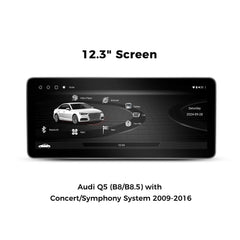
    Concert / Symphony screen and controls
    Concert / Symphony screen and controls
    Concert / Symphony screen and controls

    How to tell

    • There's no MMI control knob with function buttons beside the gear lever.
    • The radio, its buttons and knob, and a 6.5-inch colour screen form one unit in the centre of the dash, above the climate controls.
    • The radio's name, Concert or Symphony, is printed on its face.
    • Symphony has a 6-disc changer and Concert takes a single CD. Neither has a factory navigation map.

    Found in

    • A4 and S4 2009-2016 (B8/B8.5, including Avant and allroad)
    • A5 and S5 2009-2016 (8T)
    • Q5 and SQ5 2009-2017 (8R)

    Don't confuse it with

    MMI 3G in the same cars has a separate 7-inch screen at the top of the dash and a large MMI knob by the gear lever. The basic Chorus radio, with a small text display, isn't covered.

    CarPlay and Android Auto for this radio

    The ZZ-2 IT3-SYM adds wireless CarPlay and Android Auto plus front and rear camera inputs; it's an expert install, with a circuit board fitted inside the radio. The GROM AUDCVL2 VLine is another way to add wireless CarPlay and Android Auto to these radios. For a bigger display, the VINLAND VADA44XL12A8 (A4 and A5, not S or RS models) and VADQ54XL12A8 (Q5 and SQ5) swap in a 12.3-inch screen.

  2. 2004-2009

    MMI 2G

    Audi Multi Media Interface, second generation

    No plug-in kit

    How to tell

    • An MMI knob by the gear lever with four buttons around it, plus mode buttons such as NAV, INFO, CAR, SETUP, RADIO and MEDIA.
    • There's no small joystick on top of the knob.
    • Navigation maps load from a DVD drive (often in the trunk), not a hard drive.

    Quick check on the screen

    Press SETUP (on some cars press CAR first), choose Setup MMI or Settings, then Version information. On MMI 2G the software line starts with SW: rather than HNav or HN+.

    Found in

    • A6 and S6 2005-2008 (C6)
    • A8 and S8 2004-2009 (D3)
    • Q7 2007-2009 (4L)

    Don't confuse it with

    MMI 3G (2009 on) has a similar layout, but the knob has a small joystick on top, the maps are on a hard drive and the version starts HNav.

    CarPlay and Android Auto for this radio

    We don't have a plug-in CarPlay or Android Auto kit for MMI 2G. Call us and we'll talk through what's possible for your car.

  3. 2009-2017

    MMI 3G (A4 / A5 / Q5)

    MMI 3G High and MMI 3G+ (MMI Navigation plus) in the A4, A5 and Q5

    CarPlay kit available
    MMI 3G (A4 / A5 / Q5) screen and controls
    MMI 3G (A4 / A5 / Q5) screen and controls

    How to tell

    • A separate 7-inch screen fixed at the top centre of the dash.
    • MMI controls on the console behind the gear lever: a big knob with a small joystick on top, four buttons around it, and buttons such as NAV, INFO, CAR, SETUP, RADIO and MEDIA.
    • Factory navigation with maps on a hard drive.
    • The software version starts HNav (MMI 3G) or HN+ (MMI 3G+).

    Quick check on the screen

    Press MENU (SETUP on older cars; on some cars press CAR first), choose Settings or Setup MMI, then Version information. The start of the software version names the system: HNav is MMI 3G, HN+ or HN+R is MMI 3G+, RMC is the base radio without navigation, MHI2 is MIB2 High and MST is MIB2 Standard.

    Found in

    • A4 and S4 2009-2016 (B8/B8.5)
    • A5 and S5 2009-2016 (8T)
    • Q5 and SQ5 2009-2017 (8R)

    Don't confuse it with

    Concert and Symphony cars have no MMI knob, and the screen is built into the radio. On a 2009 car, call us first, as some early cars have a radio this kit doesn't fit.

    CarPlay and Android Auto for this radio

    The ZZ-2 IT3-MMI3G-A4 adds wireless CarPlay and Android Auto plus front and rear camera inputs, and plugs in at the radio. Sound plays through your car's Bluetooth audio, so make sure Bluetooth music streaming works. For a bigger display, the VINLAND VADA44YL12A8 (A4 and A5 family) and VADQ54YL12A8 (Q5 and SQ5) swap in a 12.3-inch screen.

  4. 2012-2015

    MMI 3G+ (A6 / A7)

    MMI Navigation plus (MMI 3G+) in the 2012-2015 A6 and A7

    CarPlay kit available
    MMI 3G+ (A6 / A7) screen and controls

    How to tell

    • A larger navigation screen rises out of the top of the dash when you start the car.
    • An MMI knob on the console, usually with a touchpad for writing letters, and the main buttons around it.
    • The software version shows HN+R.

    Quick check on the screen

    Press CAR, then MENU (or CAR, then SETUP, then Settings, using the button at the top right next to the MMI knob). Scroll down to the software version information. HN+R means this system. RMC means the base radio, which needs a different kit.

    Found in

    • A6 and S6 2012-2015 (C7)
    • A7 and S7 2012-2015 (4G)

    Don't confuse it with

    The base RMC radio in the same cars has a smaller screen and no navigation, and needs the RMC kit. The 2016-2018 facelift looks almost the same, but its version starts MHI2.

    CarPlay and Android Auto for this radio

    The ZZ-2 IT3-MMI3G-A6/A7 adds wireless CarPlay and Android Auto plus camera inputs, and plugs in at the radio. It doesn't work with the RMC base radio, so check the version first.

  5. 2009-2015

    MMI 3G (A6 / Q7)

    MMI 3G navigation in the 2009-2011 A6 and 2010-2015 Q7

    CarPlay kit available
    MMI 3G (A6 / Q7) screen and controls

    How to tell

    • An MMI knob by the gear lever with a small joystick on top, and NAV, INFO, CAR, SETUP and other buttons around it.
    • A fixed screen at the top of the dash with factory navigation.
    • The software version starts HNav, or HN+ on later cars.

    Quick check on the screen

    Press MENU (SETUP on older cars; on some cars press CAR first), choose Settings or Setup MMI, then Version information. The start of the software version names the system: HNav is MMI 3G, HN+ or HN+R is MMI 3G+, RMC is the base radio without navigation, MHI2 is MIB2 High and MST is MIB2 Standard.

    Found in

    • A6 and S6 2009-2011 (C6)
    • Q7 2010-2015 (4L)

    Don't confuse it with

    The 2005-2008 A6 and 2007-2009 Q7 have MMI 2G, with no joystick and maps on DVD. The 2012-on A6 uses a different kit.

    CarPlay and Android Auto for this radio

    The ZZ-2 IT3-MMI3G-A6/Q7 adds wireless CarPlay and Android Auto plus camera inputs, and plugs in at the radio.

  6. 2011-2017

    MMI 3G+ (A8)

    MMI Navigation plus (MMI 3G+) in the 2011-2017 A8

    CarPlay kit available
    MMI 3G+ (A8) screen and controls

    How to tell

    • A navigation screen that rises out of the dash.
    • An MMI knob with a touchpad for writing letters.
    • The software version shows HN+R.

    Quick check on the screen

    Press MENU (SETUP on older cars; on some cars press CAR first), choose Settings or Setup MMI, then Version information. The start of the software version names the system: HNav is MMI 3G, HN+ or HN+R is MMI 3G+, RMC is the base radio without navigation, MHI2 is MIB2 High and MST is MIB2 Standard.

    Found in

    • A8, A8 L and S8 2011-2017 (D4)

    Don't confuse it with

    The earlier A8 (to 2010) isn't covered by this kit. The 2019-on A8 has twin touchscreens and CarPlay from the factory.

    CarPlay and Android Auto for this radio

    The ZZ-2 IT3-MMI3G-A8 adds wireless CarPlay and Android Auto plus camera inputs, and plugs in at the radio.

  7. 2015-2018

    MMI 3G+ (Q3 with navigation)

    MMI Navigation plus in the Audi Q3

    CarPlay kit available
    MMI 3G+ (Q3 with navigation) screen and controls

    How to tell

    • Every Q3 has a NAV button, so the button alone doesn't tell you.
    • Press NAV: if a factory map appears, the car has factory navigation.
    • The software version shows HN+R.

    Quick check on the screen

    Press NAV and see if a map appears. To double-check, open Version information in the MMI settings: HN+R means navigation, and RMC means no navigation.

    Found in

    • Q3 2015-2018 (8U, with factory navigation)

    Don't confuse it with

    A Q3 without navigation looks almost the same but shows no map, and it needs a different kit.

    CarPlay and Android Auto for this radio

    The ZZ-2 IT3-MMI3G-Q3N is for the Q3 with factory navigation. It adds wireless CarPlay and Android Auto plus camera inputs, and plugs in at the radio.

  8. 2015-2018

    Q3 without navigation

    Audi Q3 base MMI radio without factory navigation

    CarPlay kit available

    How to tell

    • Press the NAV button: no factory map appears.
    • The software version shows RMC.

    Quick check on the screen

    Press NAV. If no map appears, this is your system. Version information in the MMI settings will show RMC.

    Found in

    • Q3 2015-2018 (8U, without factory navigation)

    Don't confuse it with

    A Q3 with navigation shows a map and needs the IT3-MMI3G-Q3N instead. This radio is also an RMC unit, but the A6 and A7 RMC kit doesn't fit the Q3.

    CarPlay and Android Auto for this radio

    The ZZ-2 IT3-MMI3G-Q3 is for the Q3 without factory navigation. It adds wireless CarPlay and Android Auto plus camera inputs, and plugs in at the radio.

  9. 2012-2015

    RMC (A6 / A7 base radio)

    Audi's base MMI radio without navigation (RMC)

    CarPlay kit available
    RMC (A6 / A7 base radio) screen and controls

    How to tell

    • A smaller 6.5-inch screen instead of the larger navigation screen.
    • No factory navigation map.
    • The software version shows RMC.

    Quick check on the screen

    Press MENU or SETUP, choose Settings, then scroll down to Version information. If RMC appears anywhere in the software version, your car has the RMC radio.

    Found in

    • A6 and S6 2012-2015 (C7)
    • A7 and S7 2012-2015 (4G)

    Don't confuse it with

    MMI 3G+ in the same cars has the bigger pop-up screen with maps and HN+R in the version, and uses a different kit. The Q3 without navigation is also an RMC unit but has its own Q3 kit.

    CarPlay and Android Auto for this radio

    The ZZ-2 ITZ-RMC adds wireless CarPlay and Android Auto to the A6, S6, A7 and S7 with the RMC radio.

  10. 2015-2020

    MIB2 (5.8- or 7-inch)

    Modular Infotainment Platform 2 with the smaller screen (MMI radio and MMI radio plus)

    CarPlay kit available
    MIB2 (5.8- or 7-inch) screen and controls
    MIB2 (5.8- or 7-inch) screen and controls
    MIB2 (5.8- or 7-inch) screen and controls

    How to tell

    • A slim 5.8- or 7-inch screen, free-standing on top of the dash in the A4, A5, Q5 and Q7, or rising out of the dash in the A3.
    • An MMI knob on the console with a MENU button and buttons around it. A touchpad on top usually comes with the navigation package.
    • The software version starts MHI2 or MST.

    Quick check on the screen

    Press MENU (SETUP on older cars; on some cars press CAR first), choose Settings or Setup MMI, then Version information. The start of the software version names the system: HNav is MMI 3G, HN+ or HN+R is MMI 3G+, RMC is the base radio without navigation, MHI2 is MIB2 High and MST is MIB2 Standard. On these cars, Version information may sit under Settings, then System maintenance.

    Found in

    • A3 and S3 2015-2020 (8V)
    • A4 and S4 2017-2020 (B9)
    • A5 and S5 2017-2020 (B9)
    • Q5 and SQ5 2018-2020 (FY)
    • Q7 2017-2018 (4M)

    Don't confuse it with

    The 8.3-inch navigation screen in the same A4, A5, Q5 and Q7 needs a different kit, so measure the screen corner to corner. Some 2015-2016 A3s have the older MIB1 system (version MHIG); call us to check.

    CarPlay and Android Auto for this radio

    The ZZ-2 IT3-MIB2 adds wireless CarPlay and Android Auto plus camera inputs, and plugs in at the radio. Check first: many 2017 and newer cars already have Audi smartphone interface (wired CarPlay and Android Auto), in which case a kit mainly adds wireless use and camera inputs.

  11. 2017-2020

    MIB2 (8.3-inch)

    MIB2 High with MMI Navigation plus and the 8.3-inch screen

    CarPlay kit available
    MIB2 (8.3-inch) screen and controls

    How to tell

    • A wider 8.3-inch free-standing screen on top of the dash, with factory navigation.
    • An MMI knob with a touchpad on top, often with the Audi virtual cockpit gauge display.
    • The software version starts MHI2.

    Quick check on the screen

    Press MENU (SETUP on older cars; on some cars press CAR first), choose Settings or Setup MMI, then Version information. The start of the software version names the system: HNav is MMI 3G, HN+ or HN+R is MMI 3G+, RMC is the base radio without navigation, MHI2 is MIB2 High and MST is MIB2 Standard.

    Found in

    • A4 and S4 2017-2020 (B9)
    • A5 and S5 2017-2020 (B9)
    • Q5 and SQ5 2018-2020 (FY)
    • Q7 2017-2018 (4M)

    Don't confuse it with

    The 7-inch screen in the same models needs the IT3-MIB2 instead. Facelifted cars from about 2020 on have a touchscreen with CarPlay built in.

    CarPlay and Android Auto for this radio

    The ZZ-2 IT3-MIB2-83 adds wireless CarPlay and Android Auto plus camera inputs, and plugs in at the radio. Check first: many of these cars already have Audi smartphone interface with wired CarPlay.

  12. 2016-2018

    MIB2 (A6 / A7)

    MIB2 in the facelifted 2016-2018 A6 and A7

    CarPlay kit available
    MIB2 (A6 / A7) screen and controls

    How to tell

    • It looks almost the same as the 2012-2015 car: a screen that rises out of the dash and an MMI knob with a touchpad.
    • The software version starts MHI2, not HN+R.

    Quick check on the screen

    Press MENU (SETUP on older cars; on some cars press CAR first), choose Settings or Setup MMI, then Version information. The start of the software version names the system: HNav is MMI 3G, HN+ or HN+R is MMI 3G+, RMC is the base radio without navigation, MHI2 is MIB2 High and MST is MIB2 Standard.

    Found in

    • A6 and S6 2016-2018 (C7 facelift)
    • A7 and S7 2016-2018 (facelift)

    Don't confuse it with

    The 2012-2015 A6 and A7 show HN+R or RMC and need different kits. The 2019-on A6 and A7 have twin touchscreens and CarPlay from the factory.

    CarPlay and Android Auto for this radio

    The ZZ-2 IT3-MIB2-A6/A7 adds wireless CarPlay and Android Auto plus camera inputs. It only fits cars with a particular factory screen connection, which our installer checks, and it's made for 2016-2017 models, so call us about a 2018.

  13. 2011-2021

    Lamborghini Aventador and Huracán

    Audi-based infotainment in the Aventador and the early Huracán

    CarPlay kit available

    How to tell

    • The menus and controls are based on Audi's MMI.
    • The software version decides the kit: RMC means the RMC kit, while HN+ or HNav means the MMI 3G kit.

    Quick check on the screen

    The menu path is similar to Audi's: press SETUP or MENU, choose Settings, then Version information, and look for RMC, HN+ or HNav.

    Found in

    • Lamborghini Aventador 2011-2021
    • Lamborghini Huracán 2014-2018

    Don't confuse it with

    The Huracán EVO and the Urus use newer touchscreen systems that these kits don't cover.

    CarPlay and Android Auto for this radio

    We fit the ZZ-2 ITB-RMC or the IT3-MMI3G-A6/A7 depending on your system version. These are more involved installs than in an Audi, so call us to confirm your car before ordering.

Still not sure which radio you have?

Text us a photo of your screen and the buttons around it, or send your VIN, and we'll tell you which kit fits.