Factory radio guide

Lexus factory radios: which one do you have?

To add CarPlay or Android Auto to a Lexus, the kit has to match your factory screen system, and Lexus has used several over the years. The quickest clue is the controller on your centre console: a mouse, a joystick, a small or large touchpad, a round knob, or nothing at all if you touch the screen. Then check for factory navigation, measure the screen and, on a 2018 or newer car, check whether CarPlay is already built in.

  1. 2000-2009, depending on model

    Early touchscreen (2000-2009)

    Lexus factory navigation or colour touchscreen from before Remote Touch

    CarPlay kit available

    How to tell

    • You work the colour screen in the middle of the dash by touching it. There's no joystick, touchpad or knob for it on the centre console.
    • Most of these cars have factory navigation, so you can bring up a map and enter a destination.
    • On 2006-2009 cars the kit needs the factory colour screen. On 2000-2005 cars it needs the factory navigation screen.
    • If your radio only shows text on a small display, see the basic radio section instead.

    Quick check on the screen

    Press the MAP or DEST button beside the screen. If a map with your position comes up, you have the factory navigation screen. Button names vary slightly by model.

    Found in

    • ES 300/330 2002-2003 (navigation)
    • ES 350 2007-2009 (factory colour screen)
    • GS 300/430 2001-2006 (navigation)
    • GS 350/430/450h/460 2007-2009 (factory colour screen)
    • GX 470 2003-2006 (navigation)
    • GX 470 2007-2009 (factory colour screen)
    • IS 250/350/IS F 2006-2009 (navigation)
    • LS 430 2001-2006 (navigation)
    • LS 460 2007-2009 (navigation, without Self Parking Assist)
    • LS 600h 2008-2009 (navigation)
    • LX 470 2001-2007 (navigation)
    • LX 570 2008-2009 (factory colour screen)
    • RX 300 2000-2003 (navigation)
    • RX 330/350/400h 2004-2006 (navigation)
    • RX 350/400h 2007-2009 (factory colour screen)
    • SC 430 2005-2009 (factory colour screen)

    Don't confuse it with

    The 2010-2015 navigation touchscreens look much the same but need a different kit, so go by model year. A radio with only a small text display is the basic radio, not this one.

  2. 2010-2015, depending on model

    Navigation touchscreen (2010-2015)

    Lexus navigation touchscreen with no console controller, 2010-2015

    CarPlay kit available

    How to tell

    • You work the colour screen by touching it. There's no mouse, joystick or touchpad on the centre console.
    • The car has factory navigation, so a map comes up when you press MAP or DEST.
    • On most 2010-2012 cars and the 2010-2013 GX 460, the kit also needs the factory USB port (in the console or glove box) that plays music from an iPhone, and an INFO PHONE button beside the screen. A button marked INFO TEL means it won't fit.
    • The RX, HS and CT of these years use a mouse-style controller instead (see Remote Touch mouse).

    Quick check on the screen

    Look at the information button beside the screen: INFO PHONE is a match, INFO TEL is not. Press MAP or DEST to confirm factory navigation, then plug in your iPhone to check that it plays through the USB port.

    Found in

    • ES 350 2010-2012 (navigation)
    • GS 350/450h/460 2010-2011 (navigation)
    • GX 460 2010-2013 (navigation)
    • IS 250/350/IS F 2010-2012 (navigation)
    • IS 250C/350C 2010-2015 (navigation)
    • LS 460/600h L 2010-2012 (navigation)
    • LX 570 2010-2011 (navigation)
    • LX 570 2013-2015 (navigation)

    Don't confuse it with

    The RX, HS, CT and LFA of the same years have a mouse-style controller on the console. Many 2010-2013 cars without navigation, such as the IS 250, have the basic radio with no colour screen, which can't take a kit.

    CarPlay and Android Auto for this radio

    For most 2010-2012 cars and the 2010-2013 GX 460 we carry GROM LEX6VL2, which takes over the factory iPod USB port. For the LX 570 and IS C from 2013 to 2015 we carry GROM LEX78TVL2. On a few cars the backup camera picture may not show while the kit is on screen; switching the radio to FM brings it back.

  3. 2010-2012

    Remote Touch mouse

    Lexus Remote Touch, first generation: a mouse-style console controller with factory navigation

    CarPlay kit available

    How to tell

    • The screen isn't a touchscreen. It sits high and set back in the dash, and on the HS 250h it pops up.
    • You move an arrow around the screen with a mouse-like controller on the console beside the shifter or armrest. It nudges back slightly when the arrow crosses a button, and you press it to select.
    • The car has factory navigation and a factory USB port that plays music from an iPhone.

    Quick check on the screen

    Press MENU next to the controller. If you can choose a destination or a map, you have the navigation system this kit needs.

    Found in

    • RX 350/450h 2010-2012 (navigation)
    • HS 250h 2010-2012 (navigation)
    • CT 200h 2011-2012 (navigation)
    • LFA 2012

    Don't confuse it with

    The Remote Touch joystick in 2013 and later models, including the 2013-2015 RX, looks similar but needs a different kit, so go by model year. The round knob on cars without navigation turns like a dial instead of gliding like a mouse.

    CarPlay and Android Auto for this radio

    We carry GROM LEX6RTVL2 for these cars. It needs the factory iPod USB port, takes it over for music, and uses your factory microphone. On some cars the backup camera picture may not show while the kit is on screen; switching the radio to FM brings it back.

  4. 2013-2021, depending on model

    Remote Touch joystick

    Lexus Remote Touch joystick, second generation, with factory navigation and a non-touch 7- to 12.3-inch screen

    CarPlay kit available

    How to tell

    • The screen isn't a touchscreen. You move around it with a short joystick on the console next to the armrest, with a few buttons such as MENU in front of it.
    • These cars have factory navigation. The same models without navigation have a round knob instead (see Display Audio round knob).
    • The screen is about 7 or 8 inches on most models, and up to 12.3 inches on the GS, the LX and the 2016-2019 RX. With a joystick, screen size doesn't change which kit you need.

    Quick check on the screen

    Press MENU by the joystick. If you see Destination, Map or Navigation, the car has factory navigation. If maps only come from the Scout GPS Link phone app, it doesn't, so see Display Audio round knob.

    Found in

    • CT 200h 2013-2017 (navigation)
    • ES 300h/350 2013-2018 (navigation)
    • GS 350/450h/200t/GS F 2013-2020 (navigation)
    • IS 250/350/200t/300 2014-2016 (navigation)
    • LS 460/600h L 2013-2017 (navigation)
    • RX 350/450h 2013-2019 (navigation)
    • LX 570 2016-2021

    Don't confuse it with

    The small square touchpad in the NX, RC and 2017 and later IS sits in the same spot, but it's flat and you slide a finger on it. A 12.3-inch screen run by a joystick is not the large-touchpad widescreen system, and the 2013-2015 LX 570 is a touchscreen car.

    CarPlay and Android Auto for this radio

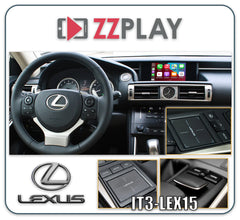
    We carry ZZ-2 IT3-LEX15 (2014-2021, ES from 2015) and GROM LEX78VL2, which needs factory navigation. For 2013 cars and the 2013-2014 ES, GROM LEX78VL2 is the kit that fits.

  5. 2015-2020, depending on model

    Remote Touch small touchpad

    Lexus Remote Touch small square touchpad with factory navigation

    CarPlay kit available

    How to tell

    • A small, flat, roughly square touchpad on the console by the armrest. You slide a finger on it to move around the screen and press down to select. The screen itself isn't a touchscreen.
    • There are a few buttons next to the pad, such as MENU and BACK.
    • These cars have factory navigation. The same models without navigation have a round knob instead.
    • On the 2017-2020 IS, the pad comes with a wide 10.3-inch screen.

    Quick check on the screen

    Press MENU by the touchpad. If you see Destination, Map or Navigation, the car has factory navigation. Scout GPS Link on its own doesn't count.

    Found in

    • NX 200t/300h 2015-2017 (navigation)
    • RC 200t/300/350/RC F 2015-2017 (navigation)
    • IS 200t/300/350 2017-2020 (navigation)

    Don't confuse it with

    The large touchpad in newer models (NX from 2018, ES and UX from 2019, LS and LC) is clearly bigger and more rectangular, and it needs a different kit. The joystick is a raised stick, not a flat pad.

    CarPlay and Android Auto for this radio

    We carry ZZ-2 IT3-LEX15 for all of these; on a 2017-2020 IS it needs a newer video cable, so mention your year when you order. We also carry GROM LEX78VL2 for the 2015-2017 NX and RC, and GROM LEX9LVL2 for the 2017-2020 IS.

  6. 2013-2019, depending on model

    Display Audio round knob

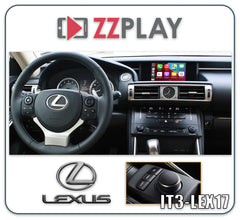
    Lexus Display Audio without navigation: a round console knob and a non-touch 7-inch screen

    CarPlay kit available

    How to tell

    • A round knob on the console near the shifter or armrest. You turn it to scroll, nudge it up, down, left or right, and press it to select. Buttons such as MENU, AUDIO and BACK sit next to it.
    • The screen is about 7 inches, it isn't a touchscreen, and the car has no factory navigation.
    • Some of these cars show maps through the Scout GPS Link phone app. That's still a car without factory navigation.

    Quick check on the screen

    Press MENU next to the knob. If there's no Destination or Navigation item, or only Scout GPS Link, you have Display Audio without navigation.

    Found in

    • ES 300h/350 2013-2018 (without navigation)
    • RX 350/450h 2013-2019 (without navigation)
    • IS 200t/250/300/350 2014-2019 (without navigation)
    • NX 200t/300h 2015-2018 (without navigation)
    • RC 200t/300/350 2015-2018 (without navigation)
    • CT 200h 2014-2017 (without navigation)

    Don't confuse it with

    The joystick and the touchpads sit in the same spot but glide like a mouse or a laptop pad; they don't turn. Don't mix up the console knob with the volume or tuning knobs on the dash.

    CarPlay and Android Auto for this radio

    We carry ZZ-2 IT3-LEX17 (2014-2021, ES from 2015, RX from 2016), GROM LEXKVL2 for most 2014-2019 models, and GROM LEXKLVL2 for the 2013-2014 ES and 2013-2015 RX. On a 2017 or newer IS, the ZZ-2 kit needs a newer video cable, so mention your year when you order. Both GROM kits also work on cars with Scout GPS Link.

  7. 2018-2021, depending on model

    Large touchpad, 7- or 8-inch screen

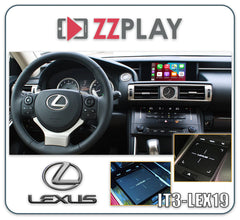
    Lexus Remote Touch large touchpad with the standard 7- or 8-inch screen

    CarPlay kit available

    How to tell

    • A large, flat, rectangular touchpad on the console, clearly bigger than the small square pad in earlier models, with buttons beside it.
    • The screen sits high in the middle of the dash and is about 7 or 8 inches, much narrower than the 10.3- or 12.3-inch widescreens.
    • These cars usually don't have factory navigation.
    • Not sure of the size? Measure the screen corner to corner.

    Quick check on the screen

    Check for factory CarPlay first. Plug your iPhone into the USB port, or press MENU and look for Apple CarPlay under Setup.

    Found in

    • ES 300h/350 2019-2021 (standard 8-inch screen)
    • UX 200/250h 2019-2021 (standard 7-inch screen)

    Don't confuse it with

    It's the same touchpad used with the widescreens. Only the screen size is different, and it decides which kit you need.

    CarPlay and Android Auto for this radio

    We carry ZZ-2 IT3-LEX19 for cars with the large touchpad and a 7- or 8-inch screen. Check first: many 2019 and later Lexus models have CarPlay from the factory, and some 2018-2019 cars got it through a dealer update. If yours does, the kit can still make CarPlay wireless and add Android Auto if your car doesn't have it.

  8. 2018-2021, depending on model

    Large touchpad, 10.3- or 12.3-inch widescreen

    Lexus Remote Touch large touchpad with a 10.3- or 12.3-inch navigation widescreen

    CarPlay kit available

    How to tell

    • A large, flat, rectangular touchpad on the console.
    • A very wide screen across the top of the dash: about 10.3 inches on the UX, NX, RC and LC, or 12.3 inches on the ES, LS and RX. The 10.3-inch screen is sometimes listed as 10.25 inches.
    • These widescreens come with factory navigation.
    • On the 2020-2021 RX you can also touch the screen, but the touchpad is still there.

    Quick check on the screen

    Check for factory CarPlay first. Plug your iPhone into the USB port, or press MENU and look for Apple CarPlay under Setup.

    Found in

    • LS 500/500h 2018-2021 (12.3-inch)
    • LC 500/500h 2018-2021 (10.3-inch)
    • ES 300h/350 2019-2021 with navigation (12.3-inch)
    • UX 200/250h 2019-2021 with navigation (10.3-inch)
    • NX 300/300h 2018-2021 with navigation (10.3-inch)
    • RC 2018-2021 with navigation (10.3-inch)
    • RX 350/450h 2020-2021 with navigation (12.3-inch)

    Don't confuse it with

    The 2016-2019 RX, the GS and the LX can also have a 12.3-inch screen, but they use a joystick and a different kit. The 2017-2020 IS has a 10.3-inch screen with the small touchpad.

    CarPlay and Android Auto for this radio

    We carry ZZ-2 IT3-LEX19L, which needs the large touchpad and the 10.3- or 12.3-inch screen, and GROM LEX9VL2, which needs factory navigation. Check first: many of these cars have CarPlay from the factory (from 2019 on most models, 2020 on the RX), and some 2018-2019 cars got it through a dealer update. If yours has it, a kit can still make CarPlay wireless and add Android Auto if your car doesn't have it.

  9. 2014-2021

    GX 460 touchscreen

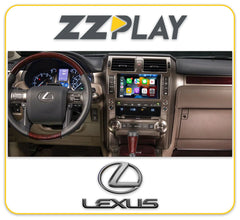
    Lexus GX 460 factory touchscreen, with or without navigation, 2014-2021

    CarPlay kit available

    How to tell

    • The GX never used a console controller. You work the screen by touching it, with buttons and knobs around it.
    • Check whether it has factory navigation, because that decides the kit.
    • CarPlay only came from the factory from the 2022 model year.

    Quick check on the screen

    Press the MAP button or the map item on the screen. A moving map with your position means the navigation version. If there's no map, it's the radio without navigation.

    Found in

    • GX 460 2014-2021 (navigation)
    • GX 460 2014-2018 (without navigation)

    Don't confuse it with

    A 2010-2013 GX 460 uses the 2010-2015 navigation touchscreen kit, and the 2003-2009 GX 470 uses the early touchscreen kits. The 2022 and later GX already has CarPlay.

    CarPlay and Android Auto for this radio

    With factory navigation, we carry ZZ-2 ITZ-GX1-A and GROM LEX78TVL2. The ZZ-2 kit works through your factory touchscreen and microphone. Without navigation (2014-2018), we carry GROM LEXKVL2.

  10. Mostly up to 2012; some later base models

    Basic radio, no colour screen

    Lexus factory radio without navigation, with a text-only display

    No plug-in kit

    How to tell

    • The radio only shows text, such as the station, track and clock, on a small display. It never shows a map or a colour picture.
    • There's no joystick, touchpad or knob on the console for a screen, because there's no screen.
    • The buttons and knobs on the radio are the only controls.

    Found in

    • IS 250/350 2010-2013 (without navigation)
    • ES 330 2004-2006 (without navigation)
    • Many other 2001-2012 Lexus models without navigation

    Don't confuse it with

    A 2013 or later Lexus without navigation that has a 7-inch screen and a round knob on the console isn't this radio. That's Display Audio, and it can take a kit.

    CarPlay and Android Auto for this radio

    There's no plug-in CarPlay kit for this radio, because every kit needs a factory colour screen. Call us to talk about other options, such as replacing the radio.

Still not sure which radio you have?

Text us a photo of your screen and the buttons around it, or send your VIN, and we'll tell you which kit fits.